 how-to
How Do You Prepare an Office for VIP Guests?
Last Updated: October 27, 2026
Quick Summary
Prepare an office for vip guests by planning days ahead, naming one visit owner, and learning guest preferences before arrival. Walk the guest's exact route room by room with a checklist, one owner per space, and a host sign-off an hour before arrival.
- Name a single point of contact for the guest's team and set a deadline for each prep task.
- Ask the guest's assistant about dietary needs, accessibility needs, and whether they want a formal tour.
- Give each room one owner and one deadline, then have the host initial the list an hour before arrival.
- Test the speakerphone from the far end of the table, where the guest will sit.
- Send a personal thank-you within one business day and log the guest's preferences for next time.
Table of Contents
- Start With Advance Planning, Not Last-Minute Scrambling
- Learn Guest Preferences Before They Walk In
- Your VIP Guest Welcome Checklist, Room by Room
- Conference Room Setup for Executive Meetings
- How to Welcome VIP Guests on Arrival Day
- Brief Your Staff and Coordinate the Team
- Executive Office Visit Preparation: The Details That Signal Respect
- After the Visit: Follow-Up That Keeps the Relationship Warm
- Frequently Asked Questions
Start With Advance Planning, Not Last-Minute Scrambling
Preparing an office for VIP guests starts with advance planning, not the morning of the visit. A calm host is a prepared host, and the work begins days before anyone walks through the door.
The biggest mistake is treating a VIP visit like a normal meeting. It is not.
So the plan needs an owner. One person should run the visit. That person builds a simple timeline:
- Confirm the date, time, and expected length of the visit
- Name a single point of contact for the guest's team
- Set a deadline for each prep task
Write it down and share it. A plan that lives in one person's head fails the moment that person is out sick.
Learn Guest Preferences Before They Walk In
Guest preferences are the difference between a good visit and a memorable one. Small details show respect: the right drink, the right seating, the right pace.
Ask the guest's assistant a few direct questions ahead of time. Most will gladly share:
- Dietary needs and drink preferences
- Whether they prefer a formal tour or a straight walk to the room
- Any accessibility needs
Keep this short. A five-minute call beats a long form. Then write the answers down and share them with everyone who will meet the guest.
A common mistake is assuming senior guests want the full tour. Many do not. Ask, then plan around the answer.
Your VIP Guest Welcome Checklist, Room by Room
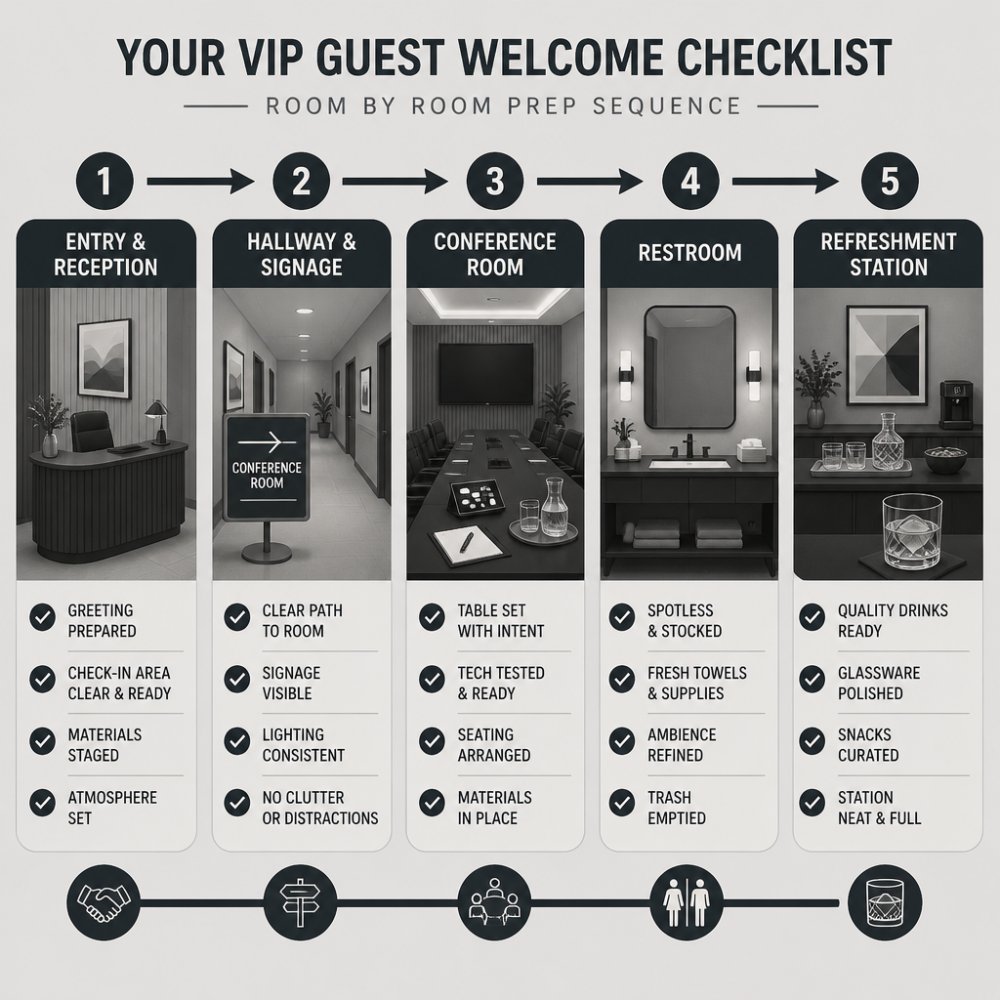
A VIP guest welcome checklist works best when it goes room by room, assigns one owner per space, and requires a physical sign-off, not a verbal 'looks good.' The goal is to walk the exact path the guest will walk and fix what you see before they see it.
Entry and Reception
- Confirm the guest's name is on the lobby or visitor list, spelled correctly, with the right title
- Assign a named greeter who has seen a photo of the guest and knows the pronunciation of their name
- Print or send drop-off and parking notes the day before; note the nearest entrance and any sign-in steps
Hallway and Signage
- Walk the route at the same time of day as the visit to catch lighting, noise, and traffic problems
- Replace any burned-out bulbs and confirm elevator access is working
- Place a printed directional sign or a staffed guide at each turn; do not rely on the guest finding their way
Conference Room
- Wipe chairs and table, clear the surface, and place name cards and a printed agenda at each seat
- Set fresh water and glasses within easy reach of every seat, not just the head of the table
- Check the temperature an hour before; most meeting rooms run cold, so have a backup layer or adjust the thermostat
Restroom
- Stock soap, towels, and toilet paper; check mirrors and counters
- Confirm the accessible stall is unlocked and unobstructed
- Do a second check 30 minutes before arrival, not just in the morning
Refreshment Station
- Provide water, coffee, tea, and any pre-arranged snacks; confirm dietary requests against the guest preference notes
- Keep a small backup supply (extra cups, stirrers, napkins) in the room so no one has to leave mid-meeting
- Place a trash bin out of direct sightline
The Sign-Off Mechanism
Give each room one owner and one deadline. A simple shared checklist with a name and time next to each item works better than a long email thread. The host does a final walk-through an hour before arrival and initials the list. If an item cannot be fixed, the host decides the workaround then, not when the guest is at the door.
Security, Confidentiality, and Access Control
Discretion is part of hospitality. A senior guest expects privacy, and the office should deliver it without being asked.
Keep the guest list tight. Only people who need to be there should be there. Put away confidential papers, whiteboards, and screens before the guest arrives, including any monitor visible from the hallway.
Confirm building access in advance. A guest stuck at a locked door is a bad first impression.
Accessibility and Inclusive Accommodations
Accessibility needs belong in the plan, not in a last-minute scramble. Ask early, then check the space yourself.
Confirm step-free routes, working elevators, and accessible restrooms along the guest's path.
Quiet matters too. A room away from loud machinery or a busy copy area helps guests who need a calmer setting.
Here is the room-by-room checklist the article recommends, with one owner and a deadline for each space.
| Room or area | Checklist items |
|---|---|
| Entry and Reception | Correct name and title on visitor list; named greeter; clear desk |
| Hallway and Signage | Walk route at visit time; replace bulbs; staffed guide at each turn |
| Conference Room | Name cards and agenda at each seat; fresh water; check temperature |
| Restroom | Stock soap, towels, toilet paper; accessible stall unlocked; recheck 30 minutes before |
| Refreshment Station | Water, coffee, tea, pre-arranged snacks; backup cups and napkins |
| Sign-Off | One owner and deadline per room; host walk-through an hour before |
Conference Room Setup for Executive Meetings
Conference room setup for executive meetings should feel calm, clean, and ready. The room sets the tone before anyone speaks, and the technology either disappears into the background or becomes the story of the meeting. Most teams check the screen and stop there; the gap is in the failure modes nobody plans for.
The Technology Readiness Check
Run this at least an hour before, with a colleague on the other end of a real call, not a solo glance at the display.
- Display and camera: confirm the screen powers on, the camera frames the table, and the room lights do not wash out faces
- Audio: test the speakerphone and ceiling mics from the far end of the table, where the guest will sit; echo and dead zones show up there first
- Video conferencing: join the actual meeting link, not a test room, and confirm the guest's remote counterparts can see and hear the room
The Room Itself
- Place name cards and a printed agenda at each seat, with the guest's name spelled correctly
- Set water and glasses within easy reach of every seat
- Check the temperature and lighting; adjust before arrival, not during the meeting
Hybrid and Remote Participants
If the meeting is hybrid, run a full test call with a colleague on the other end. Confirm the remote participants can hear the room, see the whiteboard or shared screen, and that the room can hear them. Assign one person to watch the chat and the remote attendees so the host can focus on the guest in the room.
One Human Touch
Then add one human touch. A small, well-chosen item on the table can break the ice and give people something to talk about before the agenda starts. That is the idea behind the weighted old-fashioned glasses in The Pour collection: a simple object that starts a real conversation.
The Sign-Off
Give the room one owner, the room lead, and a deadline an hour before arrival. The room lead runs the tech check, initials the checklist, and stays reachable during the meeting in case something fails. A short tech check saves a long apology; a named owner saves the scramble.
How to Welcome VIP Guests on Arrival Day
How to welcome VIP guests comes down to one rule: be ready before they arrive.
On the day itself:
- Do a final walk-through an hour before
- Put the greeter at the door early
- Greet the guest by name and offer a drink
- Keep the first few minutes light
- Guide the guest to the room without rushing
Small talk is not wasted time. It helps the guest settle in. Watch for cues: if the guest wants to get to business, move things along.
One insider tip: have a backup greeter. Doors get busy, calls run long, and someone always gets pulled away.
Brief Your Staff and Coordinate the Team
Staff communication makes or breaks a VIP visit. Everyone who might meet the guest should know the plan, even the people in the background.
Hold a short briefing two days out and a quick huddle on the morning of. Cover the guest's name and title, the schedule, the seating plan, and any special requests.
Assign clear roles:
- Host: greets the guest and runs the visit
- Room lead: owns the conference room and tech
- Front desk: handles sign-in and directions
Give the team one way to flag problems fast. A group chat works fine. The goal is a quick response time, not a long chain of emails.
Executive Office Visit Preparation: The Details That Signal Respect
Executive office visit preparation is mostly about details, and details send a message. A clean desk, a fresh drink, and a name spelled right all say the same thing: this visit matters.
Watch out: generic corporate gifts often fall flat with senior guests. If a gift is part of the plan, read why standard gifts fail with senior management before choosing.
A thoughtful option is a set of classic old-fashioned glasses.
After the Visit: Follow-Up That Keeps the Relationship Warm
Follow-up is where most teams drop the ball. Readers who want to keep the connection going can join Bourbon in the Boardroom to access exclusive bourbon content, community, and events.
Send a thank-you within one business day. Keep it personal. Mention one specific thing from the conversation.
Then close the loop inside the office:
- Share a short recap with the team
- Note what worked and what did not
- Log the guest's preferences for next time
A VIP visit tests more than your hospitality. It tests whether your team can plan, coordinate, and follow through under a little pressure.
Frequently Asked Questions
How should you welcome a VIP guest to the office?
Greet them by name at the door or lobby, not at the reception desk. Have the host walk out to meet them rather than sending an assistant. Offer a drink within the first two minutes and give a short tour on the way to the meeting room so the walk does not feel like dead time. Keep the greeting brief and confident. VIP guests notice whether the welcome felt rehearsed or genuine, and a host who personally walks them in signals that the visit matters.
What should be included in a VIP guest welcome plan?
A solid plan covers five things: the guest's known preferences (dietary, seating, scheduling), a named host and backup, a timed arrival itinerary, a prepared room with tested technology, and a follow-up owner. Build the VIP guest welcome checklist around those five items and assign each one to a person, not a department. Plans fail when responsibilities are vague. Write down who confirms the arrival time, who greets, who runs the tech check, and who sends the thank-you.
How do you prepare a conference room for an important meeting?
Test every piece of technology 24 hours ahead and again 30 minutes before. That means the video call, the screen share, the microphone, and the backup dial-in. Set seating so the guest has the sightline and the head of the table if protocol calls for it. Clear the table of clutter, stock water and glasses, and confirm the room temperature an hour before. Small failures, like a dead HDMI cable or a cold room, are what guests remember.
What should you do after a VIP guest leaves?
Send a thank-you within 24 hours, written by the host who actually met them. Reference one specific thing from the conversation so it does not read as a template. Log the guest's preferences and any commitments your team made in a shared record so the next visit starts warmer. Assign owners and dates to every follow-up item. A visit that ends without a documented next step wastes the goodwill the meeting created.